
Indian Vehicles Simulator 3D has earned a special place among simulation enthusiasts by offering one of the most immersive vehicle experiences tailored to Indian roads and culture. From cityscapes to countryside lanes, every element is crafted with authentic detail. The latest 2025 update brings a significant enhancement to customization features, including the much-talked-about Thar wheels lighting—a new way to make your vehicles stand out during night drives and add style to your fleet.
Related Posts:
If you’re eager to learn how to activate and customize the Thar’s wheel lights, or want to get a thorough understanding of this update’s other exciting features, this guide has you covered.
What is Indian Vehicles Simulator 3D?
Before diving deeper into the Thar wheels lighting, let’s revisit what makes Indian Vehicles Simulator 3D so captivating. Launched to deliver an authentic Indian driving and farming simulation, this game is unique in its focus on accurately replicating vehicles, roads, and driving conditions across India’s diverse states.
Players can command a wide variety of vehicles—ranging from buses and trucks to luxury SUVs like the Thar, farming tractors, and emergency vehicles. The expansive maps reflect real Indian geography and urban layouts, while the game’s mechanics emphasize realistic physics, including suspension and motor behavior.
The balance of faithful vehicle replication, cultural details, and engaging gameplay loops creates an experience that resonates with a growing mobile gaming community.
How to Light Up Thar Wheels in Indian Vehicles Simulator 3D
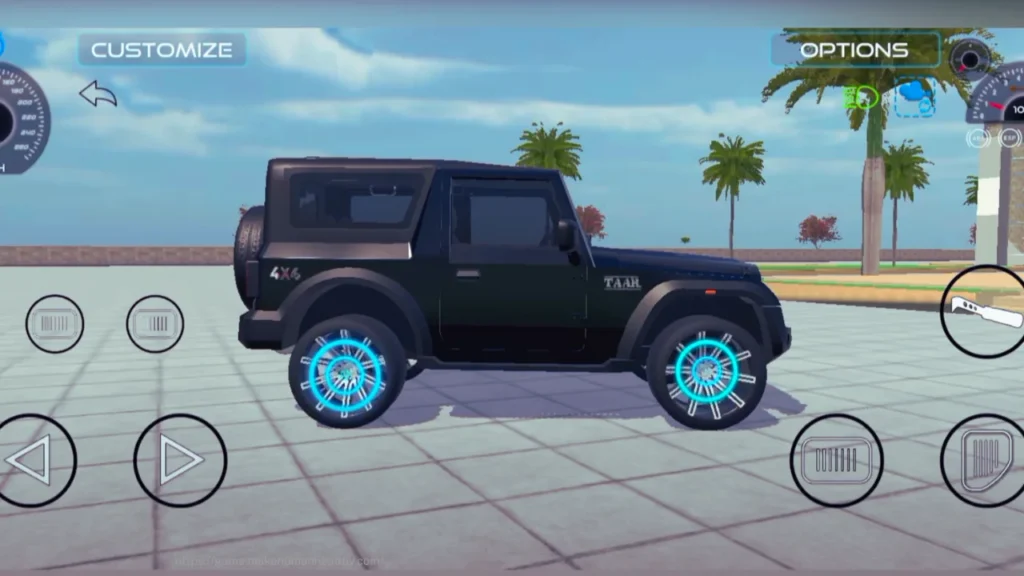
One of the standout additions in the 2025 update is the wheel lighting system, allowing players to activate luminous effects on their Thar’s rims. This not only enhances visibility during night driving but also adds a personalized flair to your vehicle.
Here’s how to enable and customize Thar wheel lighting:
- Spawn or Select Your Thar:
Launch the game and choose your Thar SUV from your garage or spawn menu. - Access the Customization Menu:
Head to the garage or vehicle customization option via the main menu. - Enter the Modification Section:
In the customization, select the modification tab that lists vehicle upgrade options. - Navigate to Wheel Customization:
Scroll to the wheel or rims section where various tire and rim upgrades are displayed. - Select the Wheel Lighting Option:
Look for “Wheel Light” or similarly named options that control rim lighting effects. - Activate and Adjust:
Turn on the wheel lights and choose your preferred color and intensity to personalize your Thar’s look. - Apply and Save:
Confirm the changes and exit customization.
Now, when driving your Thar, the wheels will illuminate beautifully, making the vehicle catch eyes in dark environments, perfect for escort missions, night routes, or simply cruising town streets with style.
Highlights of the Update
Beyond wheel lighting, the comprehensive 2025 update introduces many transformative features:
New Vehicles and Attachments
- Three new tractor models inspired by Indian brands like Mahindra, Swaraj, and TAFE.
- Attachments like ploughs, seeders, harvesters, and laser land levelers enrich farming gameplay.
- Luxury SUVs such as the Defender and new versions of Range Rover enter the playable vehicle roster.
Expanded Maps and Environmental Details
- Larger farming areas with realistic details including broken houses, ponds, and diverse wildlife.
- Enhanced road networks featuring mountain passes, rural layouts, and better urban roads.
- Day-night cycles with smooth transitions and enhanced lighting effects for deeper immersion.
Dynamic Weather and Terrain Effects
- Rain, fog, and sandstorm sequences affect visibility and vehicle handling.
- Mud physics and wet surfaces challenge player driving skills.
- Seasonal changes impact farming schedules and road conditions.
Improved Gameplay Mechanics
- Refined vehicle physics including better suspension and accurate weight distribution.
- Realistic engine behavior adjusting to altitude, load, and temperature.
- Upgraded pump and fuel management systems for longer missions.
User Interface and Controls
- Streamlined menus and HUD for easier access to vehicle stats, missions, and customization.
- Optional tactile steering and braking controls tailored for mobile devices.
Deep Dive: Farming and Vehicle Mechanics
The update’s farming improvements add precise control and richer interactions:
- Attachment Handling: Operate a range of implements, steering through complex farming workflows with realistic soil interaction.
- Vehicle Maintenance: Monitor RPM, engine health, and fuel consumption to avoid breakdowns.
- Terrain Diversity: Navigate between muddy fields, soft sand, and solid urban roads requiring adaptive driving strategies.
This system elevates farming from a side feature to a deeply engaging core gameplay component.
Visual and Audio Enhancements
- High-Resolution Textures: Vehicles, environments, and foliage appear sharper and more realistic.
- Lighting & Shadows: Natural sunlight, headlight beams, and wheel lights interplay beautifully at dawn and dusk.
- Immersive Sounds: Engine roars, tire-soil friction, ambient village sounds, and electric humming from wheel lighting complete the sensory experience.
Tips to Master the Latest Version
- Start with simple farming tasks to get familiar with vehicle controls and attachments.
- Customize your Thar’s lighting early to enhance night visibility.
- Plan routes considering weather forecasts and terrain types.
- Maintain your fleet regularly to avoid costly vehicle repairs mid-mission.
- Use different camera angles—especially interior views—to improve driving precision.
How to Download and Play the Update
To enjoy the new features including Thar wheel lighting:
- Open Google Play Store (Android) or Apple App Store (iOS).
- Search “Indian Vehicles Simulator 3D.”
- Tap Update or Install for first-time players.
- Ensure stable internet and at least 170 MB of free space.
- Launch the game and explore new vehicles, farming tasks, and customizations.
Why This Update Is Essential
The new update does more than add cosmetic effects like Thar wheel lighting—it reshapes the entire gameplay experience:
- Authentic vehicle behavior and handling add challenge and skill requirements.
- Weather and terrain impact deepen immersion and strategic play.
- Business and farming management layers integrate seamlessly with driving.
- An active community and modding support keep content fresh and creative.
For fans of realistic driving simulators with a distinctly Indian flavor, this update delivers both style and substance.
Future Prospects and Developer Insights
The developer team promises ongoing improvements, including:
- Enhanced multiplayer modes for cooperative farming and competitive driving.
- Introduction of more vehicle types, including vintage and exotic models.
- Seasonal events and environmental expansions to keep the world lively.
- Continuous bug fixes and performance upgrades.
Community feedback remains central to shaping the next phases.
Final Thoughts
The Thar wheels lighting feature symbolizes the passion behind Indian Vehicles Simulator 3D’s latest update—a blend of innovation, cultural homage, and player empowerment. Combined with sweeping gameplay enhancements, improved visuals, and expanded content, it invites players to take pride in their virtual vehicles and routes.
Step into the driver’s seat, customize your Thar’s glowing wheels, and embark on adventures through beautifully rendered Indian landscapes. Whether farming lush fields, navigating chaotic city streets, or undertaking long-haul journeys, this is the ultimate experience for bus and truck simulation fans in 2025.